The Kling AI platform is continuing to expand its capabilities for AI image and video creation, with a series of updates aimed at giving creators more control over visual consistency, resolution and cinematic movement.
The latest developments around Kling AI Image 3.0 Omni and Kling AI camera control address two long-standing challenges in generative media: keeping characters and visual elements consistent across multiple images, and directing camera movement with greater precision in AI-generated video.
For creators producing social media content, advertising campaigns, storyboards, product videos, short films and other visual projects, these changes could make AI-assisted production considerably more structured.
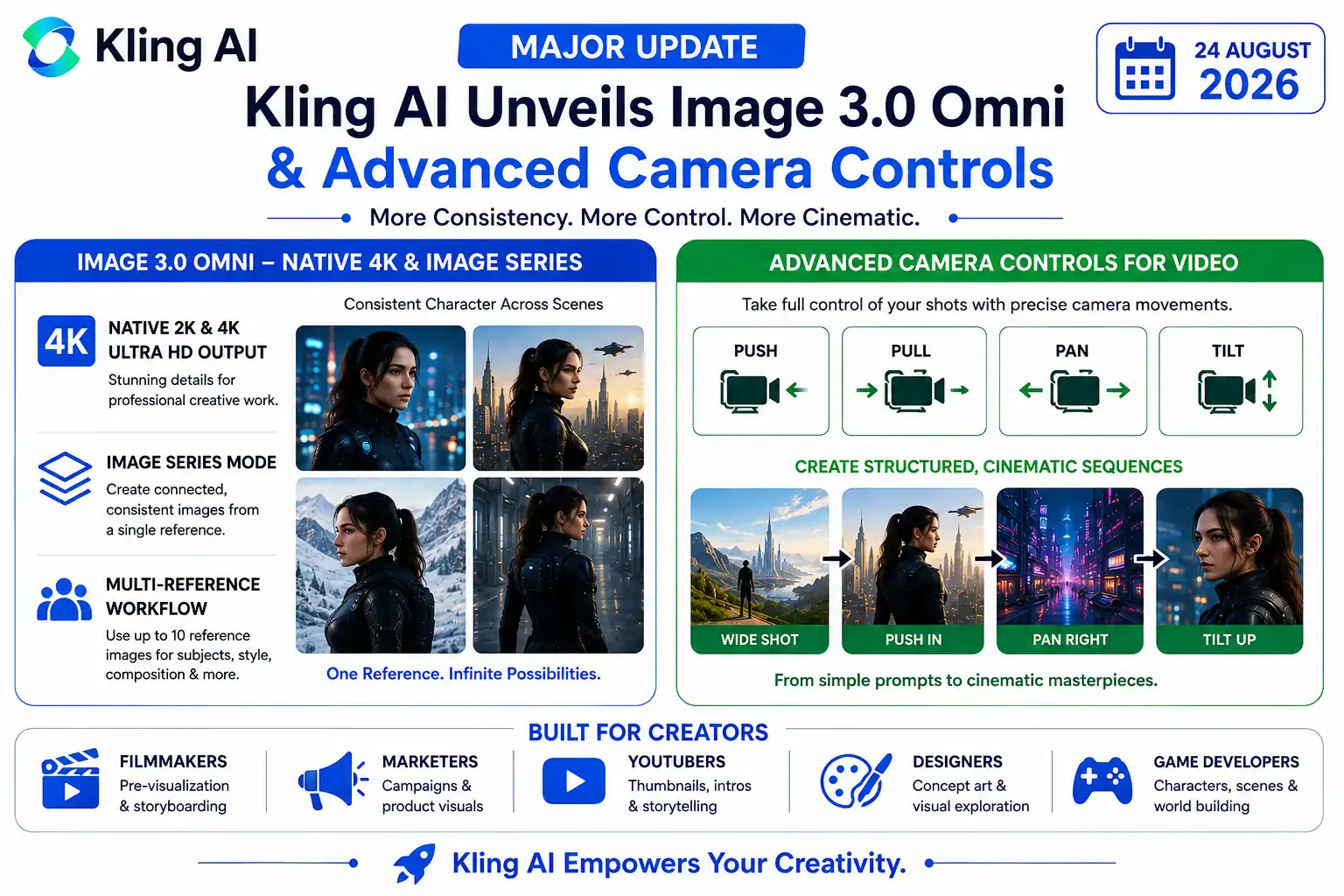
The most notable additions include native 2K and 4K image output, Image Series Mode, multi-reference workflows and more deliberate camera-movement instructions. Together, these capabilities position Kling AI as a platform focused not simply on generating individual images or clips, but on supporting more complete visual-production workflows.
Kling AI Image 3.0 Omni Brings Native 2K and 4K Generation
One of the most important additions is Kling AI Image 3.0 Omni, which supports direct 2K and 4K Ultra HD image generation.
According to Kling’s official documentation, Image 3.0 Omni is designed for cinematic narrative image creation and supports both text-to-image and image-to-image workflows. The model also adds Image Series Mode for creating connected visual sequences.
Native high-resolution generation is particularly useful for creators who need their AI-generated images for professional applications.
Instead of creating a lower-resolution image and relying on an external upscaling process, creators can generate images directly at higher resolutions.
This can be valuable for:
- Website banners
- Advertising graphics
- Product campaigns
- Posters
- Storyboards
- Social media campaigns
- Concept art
- Character design
- Film pre-visualization
- Large-screen presentations
Higher resolution does not automatically make an AI image better, of course. Composition, lighting, prompting and reference selection still matter. However, native 2K and 4K output can preserve more visual detail when an image needs to be displayed or edited at a larger size.
For professional creators, this reduces one additional step in the production pipeline.
Image Series Mode Could Help Solve Character Consistency
Perhaps the most interesting feature in the latest Kling AI image workflow is Image Series Mode.
Character consistency has been one of the biggest challenges in AI-generated storytelling.
Imagine a creator wants to produce a six-scene story featuring the same character.
With a traditional image-generation workflow, each prompt might generate a slightly different version of that person. The face could change. Clothing could change. Hair could change. Even the character’s age or body proportions could drift.
That makes it difficult to use separate AI-generated images as a coherent story.
Kling AI Image 3.0 Omni approaches this differently by providing Image Series workflows that are designed to generate connected images with greater narrative and visual coherence.
The official Kling documentation describes workflows including:
- Single-Image-to-Series Images
- Multi-Image-to-Series Images
- Text-to-Image Series
- Image-to-Image Series
- Multi-Image-to-Image Series
The system can therefore be used not just for one image, but for a sequence of related visual outputs.
Why Image Series Matters
Consider a YouTube creator developing a short animated story.
Instead of generating each scene independently, the creator could establish the character and visual direction first and then build a sequence around that reference.
The same approach could be useful for:
Advertising: A brand could create several campaign images featuring the same product and visual identity.
Storyboards: Filmmakers could visualize multiple shots before production begins.
Social media: Creators could produce a series of images that maintain a recognizable character or visual style.
Comics: Artists could maintain recurring characters across multiple panels or scenes.
Virtual influencers: A creator could establish a consistent digital personality across multiple environments.
This is one reason Kling AI‘s Image Series feature is potentially more important than simply increasing resolution.
The ability to maintain a coherent visual identity across multiple outputs is crucial for storytelling.
Multi-Reference Workflows Give Creators More Control
Another important component of the Kling AI image-generation workflow is multi-reference support.
Kling’s documentation says Image 3.0 can work with up to 10 reference images, allowing creators to provide different sources for subjects, styles, composition and other visual characteristics.
This is useful because creators rarely want to copy a single reference image exactly.
Instead, they may want to combine different elements.
For example:
- Reference 1 could provide the character.
- Reference 2 could provide clothing.
- Reference 3 could provide the environment.
- Reference 4 could establish the lighting.
- Reference 5 could influence the artistic style.
A carefully written prompt can explain which reference should control which element.
This gives creators a more structured way of communicating visual intent to the model.
Why Reference Control Matters
Without reference control, creators often have to repeatedly regenerate images until they get something close to what they want.
That can consume time and credits.
A reference-based workflow potentially reduces that trial-and-error process by giving the model more information about the desired output.
For professional creators, that can be particularly valuable because consistency is often more important than simply producing one impressive image.
Kling AI Camera Control Brings More Cinematic Direction to Video
The second major development involves video.
Kling AI camera control gives creators more deliberate ways to direct virtual camera movement in generated video.
The official Kling guide specifically discusses movements such as:
- Push
- Pull
- Pan
- Tilt
- Tracking
- Orbit
- Other structured camera movements
Rather than describing only what the subject should do, creators can describe both the subject action and the camera action.
For example, instead of writing:
“Create a cinematic shot of a woman standing in a city.”
a creator could specify:
“The camera slowly pushes toward the woman as she looks toward the city skyline.”
The second instruction gives the AI a much clearer idea of what should happen visually.
This is an important distinction for AI filmmaking.
Kling AI and Multi-Shot Storytelling
Camera control becomes even more useful when combined with multi-shot generation.
Kling AI VIDEO 3.0 and VIDEO 3.0 Omni support multi-shot workflows in which creators can structure a sequence instead of generating one isolated clip at a time.
For example, a creator could plan a short sequence like this:
Shot 1: Wide shot of a person entering a futuristic office.
Shot 2: Slow push-in as the person approaches a computer.
Shot 3: Pan across the computer screen.
Shot 4: Tilt upward toward the character’s face.
This approach resembles traditional storyboarding.
Instead of asking an AI model to invent everything at once, the creator provides a clearer structure for how the scene should unfold.
That makes Kling AI potentially useful for creators who want greater control rather than completely random visual generation.
Why Cinematic Control Matters for AI Creators
AI video generation has made it possible to create impressive scenes from text prompts. But impressive individual shots do not necessarily make a good film.
A good video also requires:
- Composition
- Continuity
- Camera direction
- Pacing
- Subject movement
- Scene transitions
- Visual consistency
This is where Kling AI‘s structured camera controls become interesting.
By combining subject instructions with camera movement, creators can begin treating AI video generation more like a production process.
Instead of simply asking for “cinematic video,” creators can make decisions about how the camera should move and why.
That could make AI-generated videos more predictable and easier to integrate into professional workflows.
Kling AI Could Be Useful for Marketing and Advertising
The new features are not limited to filmmakers.
Marketing teams could potentially use Kling AI to create product campaigns featuring consistent products across different environments.
For example, an advertising team could create a series of images showing the same smartphone:
- In a studio.
- In a city environment.
- On a desk.
- In a lifestyle scene.
- In a close-up product shot.
The Image Series workflow could help maintain the visual identity of the campaign, while high-resolution output could provide assets suitable for larger displays.
Video camera controls could then be used to create product videos with deliberate movements.
A campaign might begin with a wide shot, move into a slow push toward the product and then pan across specific features.
This is considerably more structured than simply generating random video clips.
Kling AI for YouTube and Social Media Creators
For individual creators, the biggest advantage may be speed.
Creating storyboards, thumbnails, character concepts and short video sequences traditionally requires multiple software tools.
AI can reduce some of those steps.
With Kling AI, a creator can potentially move from a written concept to reference images, connected image sequences and video clips within a relatively integrated workflow.
For YouTube creators, this could help with:
- Intro sequences
- Storyboards
- Thumbnail concepts
- Character visuals
- Short films
- Product demonstrations
- Social media advertisements
- Educational videos
The ability to generate multiple connected images could also help creators maintain a recognizable visual style across a series of posts.
Kling AI and the Future of AI Filmmaking
The latest developments suggest that AI video generation is moving toward a more production-oriented model.
Early AI video tools often focused primarily on generating visually impressive clips.
The next stage is increasingly about control.
Creators want to decide:
- Who appears in the scene?
- What do they wear?
- What environment surrounds them?
- What camera angle is used?
- How does the camera move?
- What happens in the next shot?
- Does the character remain consistent?
- Can the final image be generated at professional resolution?
The combination of Kling AI Image 3.0 Omni, Image Series Mode and camera controls addresses several of these requirements.
This does not mean AI has eliminated the need for traditional filmmaking skills.
In fact, the opposite may be true.
Creators who understand composition, cinematography, lighting and storytelling may be able to get significantly better results because they can translate those concepts into precise AI instructions.
What This Means for Professional Creators
For professional users, the biggest benefit of Kling AI may be workflow efficiency rather than simply image quality.
A professional production can involve dozens or hundreds of visual assets.
If each asset has to be generated independently, maintaining consistency becomes difficult.
Image Series Mode and reference workflows could reduce some of that complexity by providing a more structured way to generate related images.
Likewise, camera controls can help video creators create more deliberate shots instead of relying entirely on unpredictable AI motion.
The result could be a workflow in which AI handles much of the visual generation while the human creator focuses on:
- Storytelling
- Creative direction
- Editing
- Brand strategy
- Cinematography
- Final quality control
This is arguably a more realistic vision of AI-assisted filmmaking than completely automated movie production.
What Creators Should Know Before Using the New Features
Despite the improvements, creators should not expect perfect results every time.
AI-generated images and video can still contain inconsistencies.
For best results, creators should provide:
- Clear reference images
- Specific descriptions
- Simple camera instructions
- Consistent character information
- Clearly defined scene objectives
- Appropriate framing instructions
Kling’s own guides emphasize the importance of clear prompts and references. Camera movements work particularly well when they are connected to a specific subject and purpose rather than described using vague instructions.
For example, “cinematic camera movement” is relatively broad.
“Slow push-in toward the character as she looks at the window” is much more specific.
That difference can have a significant effect on the resulting video.
The Bigger Picture
The latest Kling AI developments are part of a broader transformation taking place across generative media.
AI image and video systems are gradually moving from simple prompt-to-output tools toward more sophisticated creative environments.
Creators increasingly want:
Consistency — the same characters, products and environments across multiple scenes.
Resolution — high-quality outputs suitable for professional use.
Control — the ability to specify camera movement and composition.
References — ways to tell the AI exactly which visual elements matter.
Storytelling — tools that can generate connected sequences rather than isolated images.
The combination of these capabilities could make AI much more useful for professional creative work.
Kling’s Image 3.0 Omni and Video 3.0 Omni developments demonstrate this shift particularly clearly. The focus is increasingly on creating a complete workflow rather than simply generating an impressive individual image or clip.
Final Takeaway
The latest Kling AI update represents an important step toward more controlled AI-assisted visual production.
Kling AI Image 3.0 Omni brings native 2K and 4K output together with Image Series Mode, while reference-based workflows provide creators with more ways to maintain visual consistency across multiple outputs.
On the video side, Kling AI camera control gives creators a more structured way to direct movements such as push, pull, pan and tilt. Combined with multi-shot workflows, these tools can make AI-generated video feel more like a planned production rather than a sequence of unpredictable clips.
The biggest takeaway is that Kling AI is increasingly focusing on creative control.
For filmmakers, marketers, YouTubers, designers and other digital creators, that could be more important than simply producing higher-quality AI images.
The future of AI-generated content may not be about asking a model to “make something cinematic” and accepting whatever it produces.
Instead, creators may increasingly direct AI much like a virtual production team—providing references, planning shots, controlling camera movement, maintaining character identity and building complete visual sequences.
That is where Kling AI‘s latest capabilities could have their greatest impact.
Official Kling AI Sources
- Kling AI – Image 3.0 Omni: Native 4K & Image Series Creation Guide — Official breakdown of Image Series Mode and native 2K/4K output.
- Kling AI – Camera Control Guide — Official guide to push, pull, pan, tilt and structured camera movement.
- Kling AI – Image 3.0 vs Image 3.0 Omni — Official comparison of reference workflows, Image Series Mode and high-resolution output.
- Kling AI Official Blog — Product updates, tutorials and creation guides.
Disclaimer
This article has been independently written for informational purposes using publicly available information from Kling AI’s official documentation and blog. It does not reproduce substantial portions of Kling AI’s source material. Product capabilities, availability, pricing and supported features can change over time, so readers should consult the official Kling AI website for the latest information.