AI video platform Hedra is expanding beyond a browser-based creative tool into a broader visual-AI infrastructure platform. Its recent developer push includes a unified API, native SDKs, a command-line interface, Model Context Protocol support and reusable Visual Skills.
For creators and developers, Hedra MCP and CLI are particularly interesting because they make it possible to bring Hedra’s visual-generation capabilities into AI agents and automated workflows without repeatedly opening the Hedra interface.
Hedra officially launched its expanded developer platform on August 4, 2026, offering API, SDK, CLI and MCP access. Later, on August 31, the company detailed how its Hedra MCP and CLI can connect its inference library to agents and coding environments including ChatGPT, Claude Code, Cursor, Codex, Hermes and Pi.
For creators producing large volumes of AI video, advertisements or social content, this could be more significant than simply adding another video-generation model.
The goal is automation.
What Are Hedra MCP and CLI?
The Hedra MCP and CLI provide two different ways for AI agents and developers to interact with Hedra.
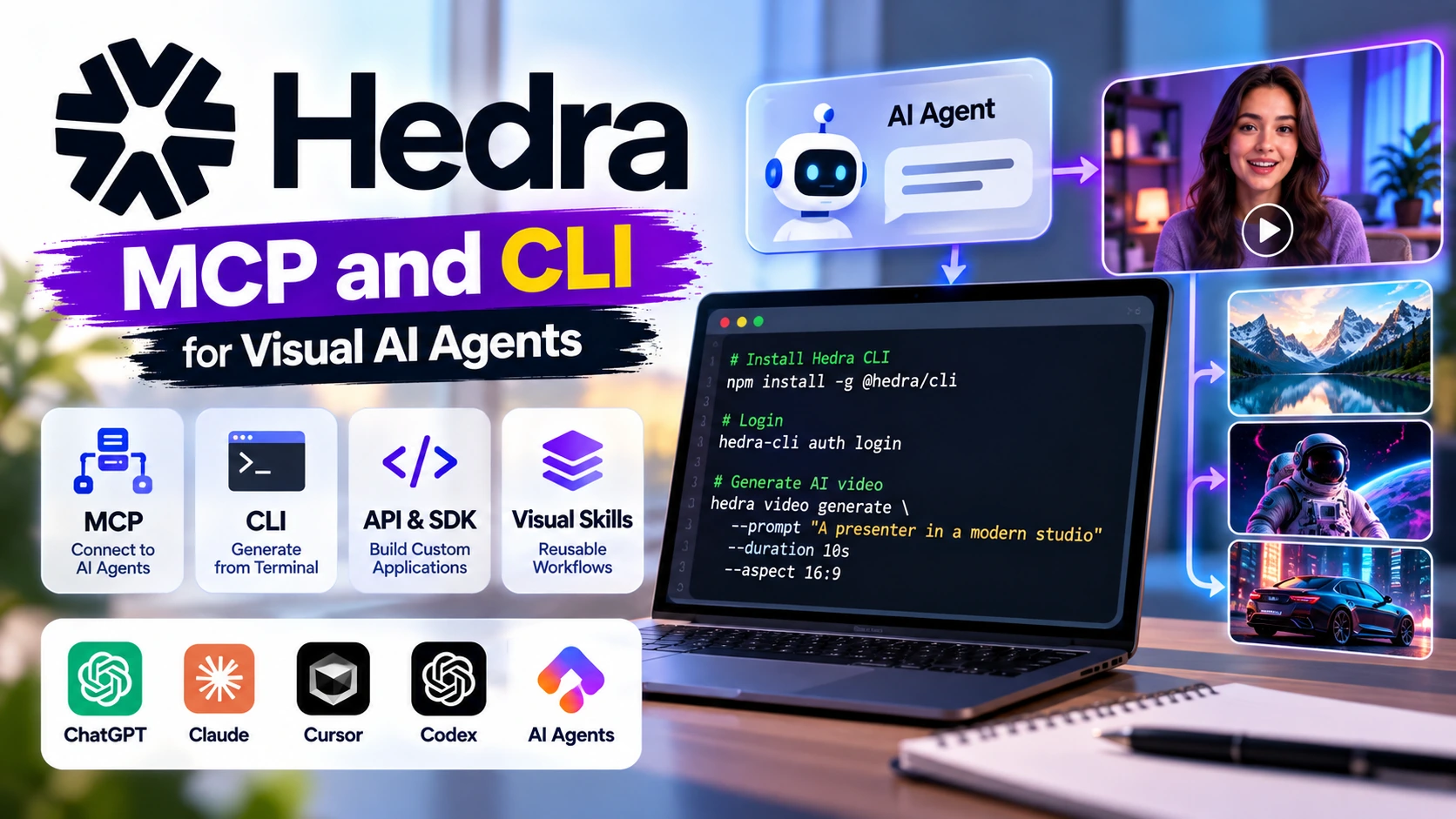
MCP, or Model Context Protocol, provides a standardized way for compatible AI applications to discover and use external tools. Hedra says its MCP is intended for chat and desktop agents such as ChatGPT, Claude, Cursor, Codex and Hermes.
The CLI, or Command Line Interface, lets developers access Hedra from a terminal or coding environment.
Hedra also offers its raw API and native Python and JavaScript SDKs. The company describes the four options this way: API for direct calls and experimentation, SDKs for production codebases, CLI for coding agents and sandboxed environments, and MCP for compatible conversational or desktop agents.
This makes the Hedra MCP and CLI part of a much broader developer strategy rather than standalone creator features.
Why Hedra MCP Matters for AI Agents
Until recently, a typical AI-video workflow might look something like this:
Write prompt → Open video generator → Paste prompt → Configure settings → Generate → Download → Return to AI assistant → Continue project
MCP can reduce some of those context switches.
Hedra provides an MCP endpoint that compatible agents can connect to. Once connected and authorized, the agent can access Hedra’s visual capabilities from the environment where the creator is already working. Hedra currently advertises generation across video, images, music and voice through this integration.
A creator could therefore ask an appropriately connected agent to generate a hero image or video rather than manually transferring the prompt between applications.
The Hedra MCP and CLI concept becomes especially useful when multiple generations form part of a larger automated project.
Hedra CLI Brings Visual Generation to the Terminal
Developers who prefer terminal-based workflows can use Hedra’s CLI.
Hedra currently documents installation with:
npm install --global @hedra/cli
Authentication can then be started with:
hedra-cli auth login
The sign-in is completed through the browser.
After configuration, a coding agent can interact with Hedra without requiring the developer to manually use the Creative Studio for each generation.
This could be useful for automated YouTube channels, personalized marketing campaigns, programmatic advertising, application development and other workflows where hundreds of visual assets may eventually need to be created.
API and SDK Complete the Developer Platform
The Hedra MCP and CLI are only two pieces of the platform.
Hedra’s developer launch also introduced native SDKs for Python and JavaScript. Hedra says these SDKs are fully typed and expose model-specific inputs, which can help catch invalid requests before they reach production.
The platform also includes several production-oriented capabilities, including live server-sent event progress, dynamic completion estimates, preflight cost estimates, signed webhooks, idempotency keys and durable asynchronous jobs.
One particularly useful feature is preflight cost estimation.
Before executing a generation, developers can estimate what it should cost based on parameters such as duration, resolution and inputs. That can be valuable when automating expensive video-generation pipelines.
One Interface for Multiple AI Models
Another notable part of Hedra’s developer strategy is model aggregation.
Hedra says developers can access Hedra models alongside open and third-party models through a common interface and billing system. Its current platform exposes multiple image and video models rather than requiring a completely separate integration for each provider.
Hedra’s current video-generation pages, for example, advertise access to models including Omnia, Veo, Kling, Seedance and MiniMax, though exact model availability can change.
For developers, that means an application could potentially switch between models according to the task without rebuilding its entire generation architecture.
What Are Hedra Visual Skills?
Another important 2026 addition is Hedra Visual Skills.
A Visual Skill is essentially a reusable workflow for Hedra’s agent with persistent reference assets.
Instead of repeatedly uploading the same logo, product image, visual reference or audio asset every time a campaign is generated, creators can attach those references to a Skill. Hedra says a Skill can hold reference images, audio and video so those assets remain available whenever that workflow is invoked.
This is particularly useful for brand consistency.
Imagine that your company has:
- A logo
- Specific product images
- Brand colors
- Reference videos
- A preferred visual style
- Signature audio
You could build a Visual Skill containing those references and corresponding instructions.
When the Skill is used again, those references travel with the workflow automatically. Hedra currently supports up to ten references per Skill, and Skills can be published for team use.
How Hedra MCP and CLI Can Help Video Creators
The benefits aren’t limited to programmers.
For creators, Hedra MCP and CLI can become the automation layer behind repetitive content production.
Automated YouTube Content
A creator could build a pipeline such as:
Topic → AI research → Script → Scene prompts → Hedra video generation → Voice → Editing → Final video
Instead of manually moving between every generation step, an AI agent could coordinate more of the process.
Personalized Marketing Videos
Marketing teams could generate variations of the same campaign for different products, audiences or markets.
A Visual Skill could preserve the brand assets while an automated workflow changes the product, copy or visual concept.
Social Media Content
A creator producing Instagram Reels, YouTube Shorts or Facebook Reels could automate generation of visual assets for multiple posts.
AI Characters
Hedra remains particularly relevant to talking-character workflows. Its platform offers audio-driven character and lip-sync generation, allowing creators to combine an image and speech with compatible character-animation models.
Hedra Subscription Plans and Pricing
Hedra currently provides a free starting option as well as paid plans for individuals, teams and enterprises. Its published monthly pricing as of October 1, 2026 is:
| Plan | Price | Credits | Key Benefit |
|---|---|---|---|
| Free | $0 | Limited/free access | Try Hedra Agent |
| Basic | $15/month | 1,500/month | Commercial use |
| Creator | $30/month | 5,400/month | Faster generation + commercial use |
| Professional | $75/month | 14,400/month | Fastest generation + Teams access |
| Teams | $75/month | 14,400/month | Team-oriented access |
| Enterprise | Custom | Custom | Custom volume, support and deployments |
Hedra’s current pricing page lists Basic at $15 per month, Creator at $30 and Professional at $75. The Enterprise tier adds options including dedicated technical support, an account manager, private deployments and SSO.
Hedra also distinguishes its developer billing from the traditional creator credit model. In its developer-platform announcement, the company said it was moving API billing toward dollar-denominated, pay-for-what-you-use pricing, paired with cost estimation before generation.
So developers should check the specific model’s API price rather than assuming that the web-app credit allowance directly represents API costs.
Step-by-Step: How to Connect Hedra to an AI Agent With MCP
The Hedra MCP and CLI setup is designed to be relatively straightforward.
Step 1: Create a Hedra Account
Visit Hedra and create or sign into your account.
You can experiment with the free offering before deciding whether your workflow requires a paid subscription.
Step 2: Open Hedra’s MCP Page
Visit the official Hedra MCP setup page.
Step 3: Add Hedra to a Compatible Agent
Configure the MCP connection in your supported AI application.
The exact steps vary depending on whether you’re using ChatGPT, Claude, Cursor, Codex or another MCP-compatible client.
Step 4: Authenticate
Complete the Hedra sign-in and authorization process.
Once connected, your agent can discover the Hedra tools exposed through MCP.
Step 5: Ask the Agent to Generate Visual Content
You could provide an instruction such as:
“Use Hedra to generate a 9:16 cinematic AI video of a futuristic creator working in a neon-lit video studio.”
The agent can then invoke the relevant Hedra functionality rather than requiring you to manually reproduce the workflow in another interface.
Step-by-Step: Using the Hedra CLI
If you prefer a command-line workflow, Hedra provides another route.
Step 1: Install the CLI
Run:
npm install --global @hedra/cli
Step 2: Sign In
Run:
hedra-cli auth login
Then complete authentication in the browser window that opens. These are the installation and login commands currently published by Hedra.
Step 3: Connect Your Coding Agent
Once authenticated, your coding environment can use the CLI as part of a broader generation workflow.
Step 4: Build an Automated Pipeline
For example:
Script → Generate reference image → Generate character video → Create supporting visuals → Save output → Continue editing
This is where Hedra MCP and CLI become especially interesting: generation can become a programmable step inside a larger creative system.
How to Create a Hedra Visual Skill
Visual Skills can make repetitive creative workflows more consistent.
Hedra’s documented process is simple: open the Skill builder, name the Skill, attach reference assets, write instructions that identify how those references should be used, then save the Skill. The references are subsequently available whenever the Skill is called by Hedra’s agent.
For example, a YouTube creator could build:
Skill name: “MiviCAI Short Video”
References: logo, preferred graphics, intro image and visual style examples.
Instructions: generate clean technology-news visuals in the established brand style, preserving the correct logo and references.
The creator can then reuse the Skill rather than reconstructing those requirements every time.
Hedra MCP and CLI: Why This Matters
The bigger story isn’t simply that Hedra has released another API.
AI agents are increasingly moving from answering questions to using external tools.
The Hedra MCP and CLI give those agents access to visual inference. Instead of an AI assistant only suggesting a prompt for a video generator, the connected agent can potentially invoke the visual-generation tool as part of its workflow.
Hedra’s API and SDKs provide the production layer, the CLI provides a terminal-friendly route, MCP connects conversational agents, and Visual Skills make reusable visual workflows possible.
For independent creators, that could mean fewer repetitive steps.
For agencies, it could mean producing more campaign variations while maintaining common reference assets.
For developers, it means visual generation can become a native function inside their applications rather than a separate manual service.
Final Thoughts
The Hedra MCP and CLI expansion marks an important change in how Hedra positions itself in 2026. The company is no longer presenting itself only as a place to generate AI videos; it is also building infrastructure through which developers and AI agents can access visual models programmatically.
Combined with the API, native SDKs and Visual Skills, this creates several ways to work with the same broader visual-AI ecosystem.
Creators can continue using Hedra’s graphical interface. Developers can build directly with the API or SDK. Coding agents can work through the CLI. Compatible conversational agents can connect through MCP. And reusable Visual Skills can preserve references and instructions across repeated creative jobs.
For creators building automated YouTube channels, personalized advertising, AI characters, social campaigns or custom creative applications, Hedra MCP and CLI could therefore be worth exploring—not because they replace creative decisions, but because they can automate more of the repetitive infrastructure around those decisions.
Official links: Hedra MCP and CLI · Hedra Developer Platform · Hedra Visual Skills · Hedra Pricing