This news report contains affiliate links. We may earn a commission on purchases made through these links at no extra cost to you. Our coverage is based on official ElevenLabs information and independent hands-on testing. Please review their voice samples and plans before buying.
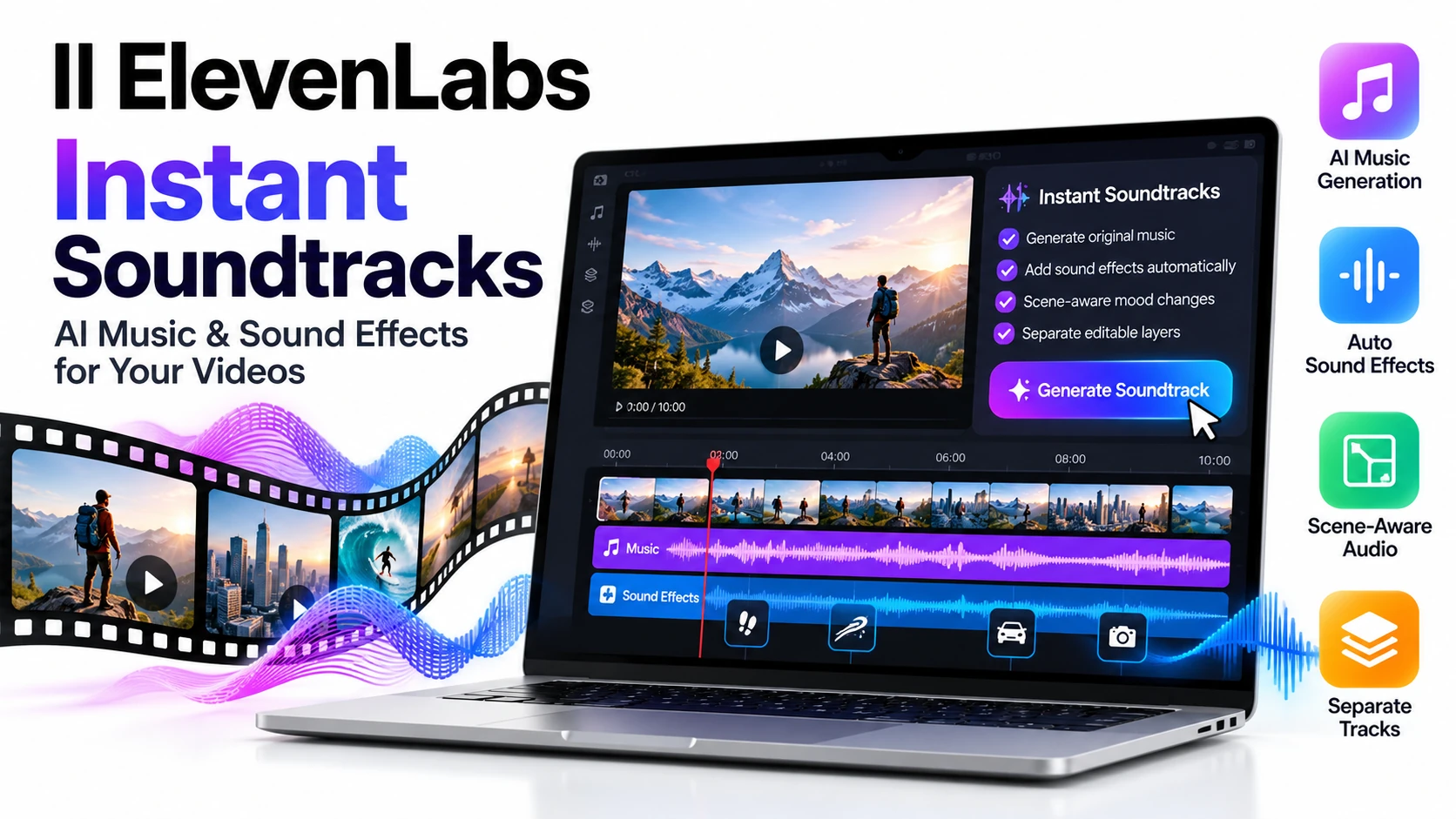
ElevenLabs Instant Soundtracks is a new feature that adds original background music and sound effects to a video you upload, without manual editing. ElevenLabs announced it on October 15, 2026, and says it is available now in ElevenCreative, ElevenMusic and its API.
For YouTubers and anyone building automated video workflows, the big question is how well it works on a full-length video. This guide explains what ElevenLabs Instant Soundtracks does, what its limits are, and how to test it on a 10-minute video before you rely on it.
What is ElevenLabs Instant Soundtracks?
ElevenLabs Instant Soundtracks is a video-to-audio feature. You upload a video, and the model does two jobs in one pass:
- Composes original music that scores the video.
- Places sound effects by analyzing the footage for moments that need one, then generating an effect at the matching timestamp.
ElevenLabs gives one example: a whoosh sound timed to a logo appearing at the end of an ad. The effects are placed on the timeline automatically.
You can use it in four places: the Music Video Editor in ElevenCreative’s music tab, Creative Engine (for ads), the ElevenMusic platform, and the ElevenCreative Studio API.
Key features of ElevenLabs Instant Soundtracks
- Scene-aware mood changes: the music can shift between scenes. ElevenLabs’ example is a fast scene backed by EDM or R&B that moves to acoustic guitar for a slower, more intimate scene.
- Your own audio as a style reference: the model can use the audio already in your video as a guide, such as its genre, build-ups, tempo (beats per minute) and instruments. The new music follows that style instead of starting from scratch.
- Separate editable layers: in the Music Video Editor, sound effects appear as their own layers. You can add more effects, change timing, swap the music or fix single moments without starting over, then export.
- Short-form timing: ElevenLabs says the feature is built for the pace of short-form video, with tighter timing around cuts, transitions and on-screen action.
ElevenLabs Instant Soundtracks API and limits
Developers can use the feature through the ElevenCreative Studio API, which adds three new parameters:
add_sfxto include sound effectsseparate_tracksto keep music and effects apartuse_audio_as_referenceto use the video’s existing audio as a style guide
When you set separate_tracks=true, the API returns a .zip file with the music and the sound effects as separate files. You can then mix them in your own pipeline or in ElevenLabs Studio.
Each request accepts up to 10 videos, with a combined limit of 200 MB and 10 minutes of video. That means a single 10-minute video uses up the whole time limit of one request.
Who could use ElevenLabs Instant Soundtracks?
These are possible uses based on what ElevenLabs announced, not tested results:
- YouTubers and short-form creators who spend hours finding music and placing sound effects by hand.
- Teams with automated video workflows. If your pipeline currently generates music in one tool, plans effect cues manually and fixes timing in an editor, one request that returns music and effects on separate tracks could replace several of those steps.
- Ad makers. ElevenLabs lists Creative Engine as a place to add music and effects to ads.
The separate tracks matter most for automation. You keep control of the mix and can fix one layer without redoing the other.
Can ElevenLabs Instant Soundtracks score a 10-minute YouTube video?
It can accept one, since the API limit is 10 minutes of video per request. Whether the result is good is a different question. ElevenLabs describes the feature as built for short-form pacing, and the launch material does not show results on long videos. The only way to know is to test it.
Use a finished video you know well, and check these five things:
- Scene-aware music changes. Does the mood follow your scene changes, and do the transitions sound smooth?
- Dialogue audibility. Can you clearly hear narration over the music? The launch material does not explain how music is balanced against speech, so with separate tracks you may need to set the levels yourself.
- Sound-effect accuracy. Are the effects the right sounds at the right moments, without random extras?
- Manual corrections. Count how many fixes you needed and how long they took.
- Cost. Work out the cost per finished minute and compare it with your current music and sound-effect workflow.
Write the results down. If the corrections take longer than doing it the old way, the automation is not saving you anything yet.
What is still unclear about ElevenLabs Instant Soundtracks
Several questions are worth checking before you build a workflow around it:
- Price. The cost of a combined music-and-effects job is not spelled out in the launch coverage. Check ElevenLabs’ pricing page.
- Commercial use. If you publish videos for income or for clients, read ElevenLabs’ terms for generated music and effects.
- Long videos. Results on 10-minute videos are untested in the launch material.
- Speech. There is no detail on how the music behaves under narration or dialogue.
As with any new AI tool, start with one video, check the output carefully and expand only if the results hold up.
Frequently asked questions
What is ElevenLabs Instant Soundtracks?
It is an ElevenLabs feature that analyzes an uploaded video, composes original background music and adds sound effects at matching moments.
When was ElevenLabs Instant Soundtracks launched?
ElevenLabs announced it on October 15, 2026, and says it is available immediately.
Where can I use ElevenLabs Instant Soundtracks?
In the Music Video Editor in ElevenCreative, in Creative Engine for ads, on the ElevenMusic platform and through the ElevenCreative Studio API.
Can I edit the music and sound effects separately?
Yes. In the editor, sound effects sit on their own layers. In the API, separate_tracks=true returns music and effects as separate files.
What are the API limits for ElevenLabs Instant Soundtracks?
Up to 10 videos per request, with a combined limit of 200 MB and 10 minutes of video.
Can ElevenLabs Instant Soundtracks use my video’s existing audio?
Yes. You can use it as a style reference, so the new music follows its genre, tempo and instruments.
Is ElevenLabs Instant Soundtracks free?
The launch coverage does not state a price for the feature. Check ElevenLabs’ pricing page for current costs.
Try ElevenLabs through my affiliate link
Sources
- ElevenLabs: Introducing Instant Soundtracks