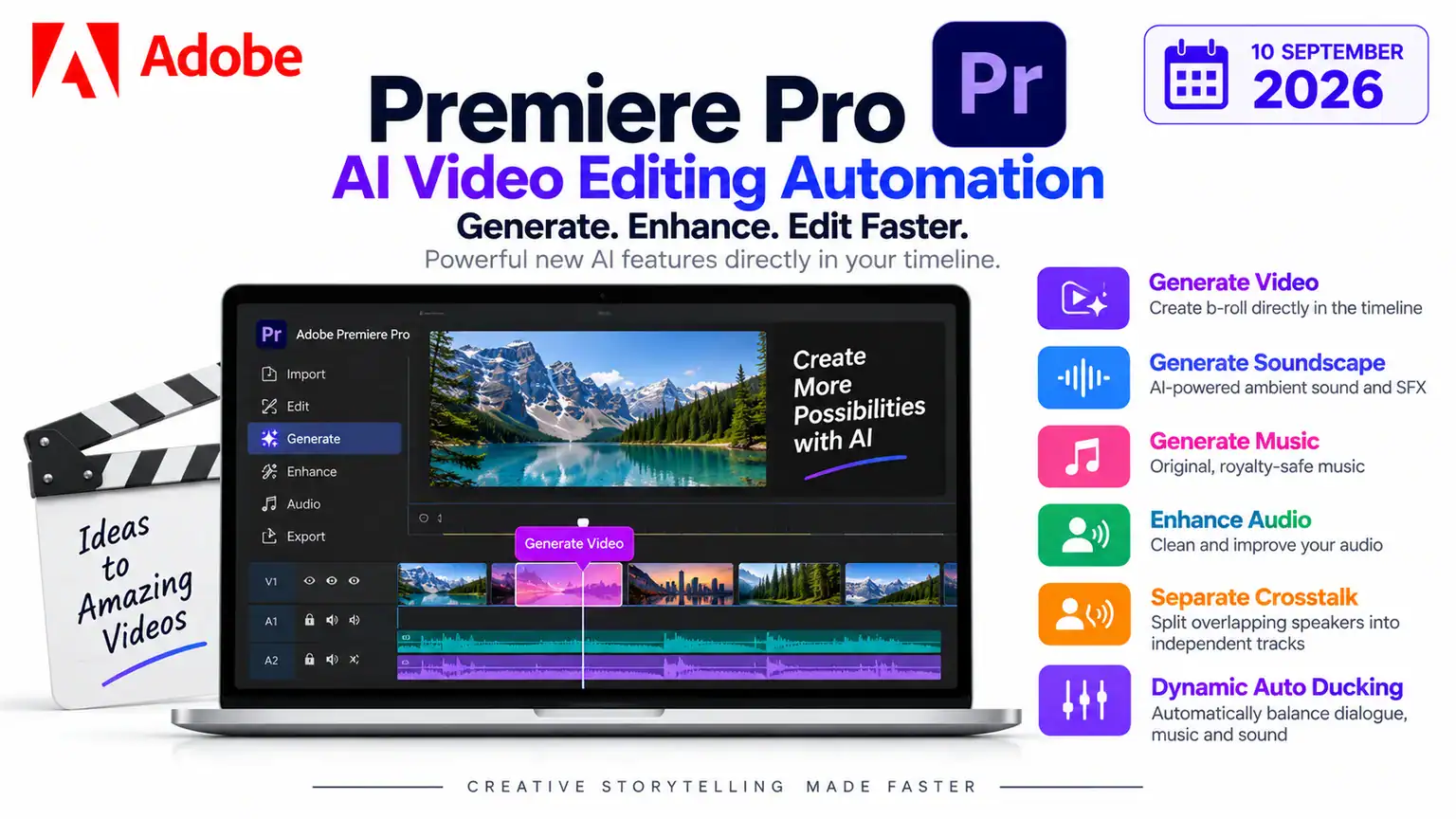
Adobe is taking Adobe Premiere Pro AI video editing to another level with a major collection of AI-powered features designed to automate some of the most time-consuming parts of professional video production.
Ahead of IBC 2026, Adobe announced new AI innovations for Premiere and After Effects that bring generative video, sound effects, music and advanced audio processing directly into the editing timeline. The company says the goal is simple: allow editors to spend less time searching for assets and fixing technical problems and more time concentrating on storytelling and creative decisions.
The update is particularly interesting for YouTubers, filmmakers, social-media creators and agencies because several tasks that previously required leaving Premiere, searching external libraries or manually editing audio can now be handled directly inside the application.
Among the most important additions are Generate Video, Generate Sound Effects, Generate Soundscape, Generate Music, Enhance Audio, Separate Crosstalk and Dynamic Auto Ducking. Adobe also gives editors a choice of generative models, including Adobe Firefly and partner models such as Google Veo, Kling, Runway and Luma.
For creators looking for an efficient Adobe Premiere Pro AI video editing workflow, this could be one of Adobe’s most important updates yet.
What Is New in Adobe Premiere Pro?
The latest update focuses on bringing AI directly into the timeline.
Previously, an editor might have to:
- Leave Premiere.
- Search a stock-video library.
- Download a suitable clip.
- Import it.
- Search for sound effects.
- Download audio files.
- Edit and synchronize everything manually.
Adobe’s new Adobe Premiere Pro AI video editing features are designed to reduce those interruptions.
The new tools can generate video and audio assets directly in the timeline while also helping editors clean up dialogue and balance different audio elements.
This is an important shift because generative AI is moving from being a separate creative application into the actual professional editing workflow.
Generate Video Fills Gaps Directly in the Timeline
One of the headline features is Generate Video.
Editors can use it when they have an unwanted gap, missing B-roll or transition that needs additional footage. Premiere can use reference frames sampled from the existing project to generate footage that better matches the surrounding edit.
This could be extremely useful for creators.
Imagine recording a YouTube video and discovering that you forgot to shoot a few seconds of B-roll. Traditionally, you would need to return to the location, find stock footage or use another AI video-generation service.
With the new workflow, an editor can potentially generate suitable supplementary footage without leaving Premiere.
How This Helps YouTubers
For a YouTube creator, this could be useful for:
- Filling short visual gaps
- Creating establishing shots
- Adding B-roll
- Covering jump cuts
- Creating transition footage
- Visualizing concepts discussed in narration
- Supporting documentary-style videos
The generated footage does not necessarily replace original production. Instead, it can function as an additional creative resource when something is missing.
Adobe Gives Editors a Choice of AI Models
Another interesting aspect of Adobe’s approach is that users aren’t necessarily limited to a single AI model.
Adobe says Premiere’s generative tools can use Adobe Firefly as well as partner models including Google Veo, Kling, Runway and Luma.
This is potentially valuable because different models can produce different visual styles and results.
An editor might prefer one model for realistic B-roll, another for a particular visual style and another for experimentation.
Instead of constantly downloading and importing material from different AI platforms, the editor can increasingly perform the work inside the Premiere environment.
This could make Adobe Premiere Pro AI video editing considerably more convenient for professional workflows.
Generate Sound Effects Without Leaving Premiere
Video isn’t only about visuals.
Sound effects can have a huge impact on the quality of a video, but searching through audio libraries can be surprisingly time-consuming.
Adobe’s new Generate Sound Effects tool allows editors to generate sound effects directly inside the timeline. Adobe says the tool is powered by its commercially safe audio model and can even use the creator’s voice to guide the rhythm, timing and intensity of the generated sound.
For example, a creator could need:
- Footsteps
- Door sounds
- Mechanical noises
- Environmental effects
- Impacts
- Movement sounds
- UI sounds
- Atmospheric effects
Instead of searching a stock library for every individual sound, creators can generate appropriate audio within the editing environment.
Generate Soundscape Creates Context-Aware Audio
Another major feature is Generate Soundscape, currently described by Adobe as being in beta.
This feature can analyze up to 15 seconds of video and automatically generate contextually informed audio containing layers of ambience and sound effects. The generated audio is timed to the edit and intended as a starting point that editors can further refine.
This is particularly interesting for creators producing cinematic or documentary-style videos.
For example, imagine a video showing someone walking through a forest.
Instead of manually adding separate sounds for:
- Wind
- Leaves
- Birds
- Footsteps
- Environmental ambience
the creator can use Generate Soundscape to produce an initial audio environment based on the visual content.
The editor can then refine the result.
This is another important development for Adobe Premiere Pro AI video editing because AI is no longer being used only to generate visuals. It is beginning to understand the relationship between the image and its surrounding sound.
Generate Music Adds Another Creative Option
Adobe is also adding Generate Music, currently in beta.
The tool can generate original music with multiple variations and provide controls for tempo and looping. Adobe says the generated music is commercially safe and includes synchronization rights across media.
This could be particularly useful for:
- YouTube videos
- Instagram Reels
- TikTok videos
- Advertisements
- Explainer videos
- Corporate presentations
- Short films
For independent creators, music licensing can be complicated. Having an integrated AI music-generation option could simplify the process of creating background tracks for original content.
Enhance Audio Gets More Powerful
One of the most practical improvements is Enhance Audio.
Adobe says the new audio tools can provide independent control over dialogue, music, ambience and sound effects within a single clip. This means editors can remove or adjust individual elements instead of treating the entire audio recording as one combined track.
This could be extremely helpful for creators recording videos in imperfect environments.
For example, a creator might record dialogue while background music and environmental sounds are also present.
Instead of re-recording everything, Premiere’s AI tools can help separate and adjust those elements.
Separate Crosstalk Can Split Overlapping Speakers
Another particularly impressive feature is Separate Crosstalk.
When two people speak at the same time, traditional editing can become difficult because both voices are captured in the same recording.
Adobe says Separate Crosstalk can automatically split two overlapping speakers into independent tracks for separate mixing and editing, without requiring the conversation to be recorded again.
This could be extremely useful for:
- Podcasts
- Interviews
- Street interviews
- Documentary production
- Panel discussions
- YouTube conversations
- Corporate recordings
For creators who regularly record interviews, this feature could save considerable editing time.
Dynamic Auto Ducking Automates Audio Mixing
Premiere is also adding Dynamic Auto Ducking.
The tool automatically balances dialogue, music and other audio elements without requiring editors to create manual keyframes.
This can simplify a common editing task.
When someone begins speaking, background music generally needs to become quieter. When the dialogue stops, the music can return to a higher level.
Traditionally, editors often create keyframes manually to achieve this effect.
AI-powered dynamic ducking can automate much of that process.
How These Features Help YouTube Creators
For YouTubers, the new Adobe Premiere Pro AI video editing features could significantly reduce production time.
A typical YouTube workflow might now look like:
Record → Import → Edit → Generate B-roll → Generate Soundscape → Enhance Dialogue → Separate Speakers → Auto Duck → Export
Instead of switching between multiple applications, creators can perform much more of the production process inside Premiere.
This is particularly valuable for creators who publish frequently.
A creator producing two or three videos every week may spend many hours performing repetitive editing tasks. Automating even small parts of that workflow can add up to substantial time savings.
How This Helps Short-Form Creators
The update isn’t only useful for traditional filmmakers.
Instagram, TikTok and YouTube Shorts creators can also benefit.
Short-form videos often require:
- Fast cuts
- B-roll
- Sound effects
- Background music
- Dialogue cleanup
- Audio balancing
- Visual transitions
AI automation can help accelerate these tasks.
For example, a creator could record a talking-head video and then use AI to improve the dialogue, separate overlapping speakers, add appropriate ambience and generate supplementary B-roll.
That makes Adobe Premiere Pro AI video editing relevant not only to Hollywood-style production but also to independent creators.
Adobe Premiere Pro Subscription Plans in the USA
The new AI-powered features are available through Adobe’s Premiere subscription ecosystem. For creators in the United States, Adobe currently offers Premiere as a standalone subscription or as part of the broader Creative Cloud Pro plan.
Adobe currently lists Premiere for individuals at US$22.99 per month, based on an annual plan billed monthly. The standalone plan includes Premiere for desktop and iPhone, Adobe Express Premium, Frame.io, 100GB of cloud storage and 25 monthly generative credits for eligible AI features.
For creators who also use applications such as Photoshop, After Effects and Illustrator, Creative Cloud Pro can offer significantly more value. Adobe currently lists Creative Cloud Pro for individuals at US$34.99 per month for the first three months, followed by the regular price of US$69.99 per month, with annual billing paid monthly. The promotion is for eligible new subscribers.
Creative Cloud Pro includes 20+ creative applications, including Premiere, Photoshop and Illustrator, along with 4,000 monthly generative credits for premium creative AI features.
Adobe Plans at a Glance
| Plan | Current U.S. price | Best for |
|---|---|---|
| Premiere – Individual | US$22.99/month | Video editors, YouTubers and content creators |
| Creative Cloud Pro – Individual | US$34.99/month for first 3 months | Creators using multiple Adobe applications |
| Creative Cloud Pro – Regular price | US$69.99/month | Full-time professional creators |
| Premiere – Teams | US$37.99/month per license | Businesses and professional teams |
| Creative Cloud Pro – Students & Teachers | US$19.99/month for the first year | Eligible students and teachers |
Adobe lists a 7-day free trial for Premiere, while the comparison page also indicates free-trial options for Creative Cloud plans.
For a YouTuber or independent video creator who primarily needs professional editing, Premiere at US$22.99/month is the more economical option. However, creators who regularly use Photoshop, After Effects and other Adobe applications may find Creative Cloud Pro more cost-effective because it combines 20+ apps with a much larger allocation of generative AI credits.
Prices and promotional offers can change, so U.S. customers should check Adobe’s official Premiere pricing page before subscribing.s can change, so creators should check Adobe’s current India pricing before subscribing.
Do You Need Creative Cloud Pro?
Not necessarily.
If you mainly edit videos, the standalone Premiere plan may be sufficient.
However, if you also create thumbnails in Photoshop, motion graphics in After Effects, illustrations in Illustrator and AI assets through Firefly, Creative Cloud Pro can be more attractive because it bundles more than 20 applications and provides a much larger generative-credit allowance.
For a full-time YouTuber or professional content creator, this broader package could therefore offer better overall value.
Are the New AI Features Free?
The answer depends on the feature and your subscription.
Premiere itself is a paid application after the free trial, and Adobe’s plans include monthly generative credits for AI-powered features. The individual Premiere plan currently includes 25 monthly generative credits, while Creative Cloud Pro includes 4,000 monthly generative credits for premium creative AI video and audio features.
Therefore, creators should not assume that unlimited AI generation is included with a Premiere subscription.
Generative AI usage can consume credits depending on the feature.
The Bigger Picture for AI Video Editing
Adobe’s update illustrates a broader change happening across the creative industry.
AI video tools initially focused primarily on generating clips from text prompts.
The next stage is increasingly about integrating AI directly into professional workflows.
Instead of creating a clip in one application and importing it into another, editors can increasingly generate, modify, analyze and refine content inside the editing timeline.
That’s arguably more important for professionals than simply producing another standalone AI video generator.
Adobe is effectively turning Premiere into an increasingly intelligent editing environment.
Final Verdict
The latest Adobe Premiere Pro AI video editing update could significantly change how creators approach video production.
The new Generate Video feature can create supplementary footage directly in the timeline. Generate Sound Effects can create audio assets without leaving Premiere. Generate Soundscape can analyze up to 15 seconds of video and create context-aware ambience, while Generate Music can produce original music variations.
On the editing side, Enhance Audio, Separate Crosstalk and Dynamic Auto Ducking address some of the most frustrating audio-production tasks.
For YouTubers, bloggers who create videos, social-media creators and professional editors, these features could save hours of repetitive work.
The subscription pricing also makes the platform accessible to creators with different needs and budgets. The standalone Premiere plan costs US$22.99/month for an annual plan billed monthly, while Creative Cloud Pro is currently offered at US$34.99/month for the first three months for eligible new subscribers. Creative Cloud Pro provides access to 20+ Adobe applications and 4,000 monthly generative credits, making it a more comprehensive option for professional creators.
Ultimately, Adobe is moving toward a future where AI doesn’t simply generate content—it becomes part of the editing process itself.
For creators who spend hours searching for B-roll, fixing dialogue, creating sound effects and balancing audio, Adobe Premiere Pro AI video editing could turn many of those repetitive tasks into much faster, AI-assisted workflows.
FAQ Section
1. What are the new AI features in Adobe Premiere Pro?
Adobe’s latest update adds Generate Video, Generate Sound Effects, Generate Soundscape, Generate Music, Enhance Audio, Separate Crosstalk, and Dynamic Auto Ducking — all built directly into the Premiere timeline so editors don’t need to leave the app to source assets.
2. What does Generate Video do in Premiere Pro?
It creates supplementary footage — like B-roll, transitions, or filler for gaps — using reference frames from your existing project, so the generated clip matches your edit’s look and feel.
3. Which AI models can I use for generative video in Premiere?
Editors can choose between Adobe Firefly and partner models including Google Veo, Kling, Runway, and Luma, depending on the visual style they want.
4. What is Generate Soundscape and how does it work?
It’s a beta feature that analyzes up to 15 seconds of video and automatically generates context-aware ambient audio and sound effects timed to your edit — useful as a starting point you can refine further.
5. Is the AI-generated music free to use commercially?
Adobe says music generated through Generate Music is commercially safe and includes synchronization rights across media, though usage still draws from your plan’s monthly generative credits.
6. What does Separate Crosstalk do?
It automatically splits two overlapping speakers from a single recording into separate tracks, so editors can mix and clean up dialogue without needing to re-record interviews or conversations.
7. What is Dynamic Auto Ducking?
It automatically lowers background music when dialogue is present and raises it again when speech stops — a task editors traditionally handled manually with keyframes.
8. How much does Adobe Premiere Pro cost in India?
Premiere is priced at ₹599/month (including GST) for the first year for eligible new subscribers, rising to ₹733.96/month afterward. It includes 25 monthly generative credits.
9. Is Creative Cloud Pro worth it over standalone Premiere?
If you only edit video, standalone Premiere is likely enough. But if you also use Photoshop, After Effects, or Illustrator, Creative Cloud Pro (₹1,199/month first year) offers over 20 apps and 4,000 monthly generative credits, which may be better value for full-time creators.
10. Do these AI features use unlimited generations?
No. AI features consume monthly generative credits, which vary by plan — 25 credits with standalone Premiere versus 4,000 with Creative Cloud Pro — so heavy AI usage may require the higher-tier plan.
11. How do these features help YouTubers specifically?
They cut down on tasks like searching stock libraries, cleaning up dialogue, and manually balancing audio — letting creators generate B-roll, ambience, and music, and clean up interviews, all inside one app instead of switching between multiple tools.