The way musicians and audio professionals use generative artificial intelligence is changing rapidly. Instead of treating AI music generation as a separate browser-based experiment, creators are increasingly looking for ways to incorporate AI directly into established production workflows.
That is exactly where Stable Audio 3.0 is making its latest move.
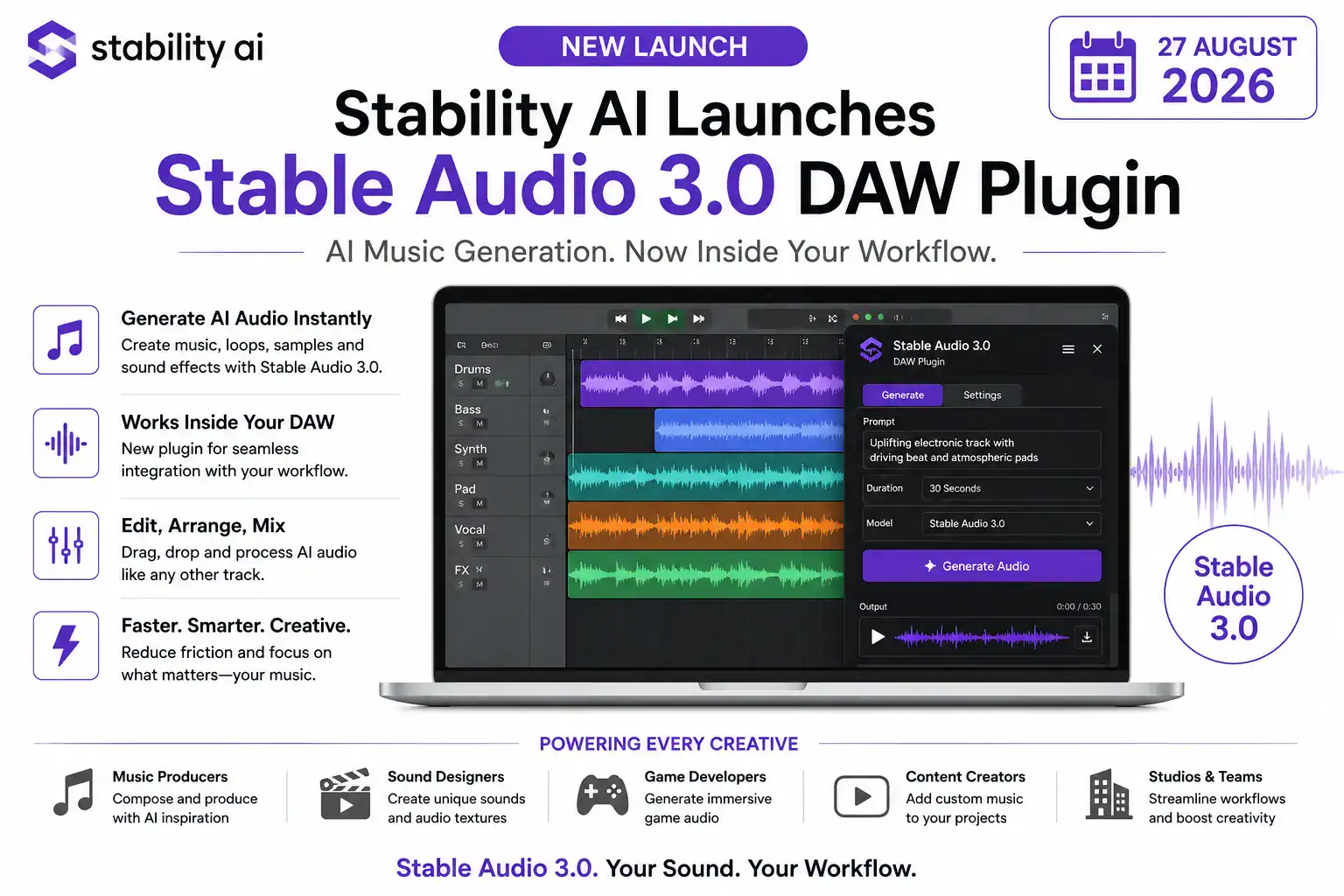
Stability AI has introduced a new DAW plugin for Stable Audio 3.0, allowing music producers, sound designers and audio engineers to generate AI-powered audio directly inside compatible digital audio workstations. At the same time, the company has introduced a more advanced StableAudio.com experience designed for iterative generation, editing, mixing and experimentation. The two experiences entered beta on August 18, 2026.
The significance of the update goes beyond simply adding another way to access an AI music generator.
With the Stable Audio 3.0 DAW plugin, creators can generate material within their existing production session and then arrange, edit, process and mix that material alongside traditionally recorded or previously created audio.
That could help reduce one of the biggest frustrations associated with AI music tools: moving repeatedly between an AI website and professional audio-production software.
What Is the Stable Audio 3.0 DAW Plugin?
The Stable Audio 3.0 DAW plugin is designed to bring AI audio generation directly into a Digital Audio Workstation.
A DAW is the central software environment used by musicians and producers to record, arrange, edit and mix music. Popular workflows involve software such as Ableton Live, Logic Pro, Cubase and other professional production platforms.
Previously, a producer interested in using generative AI might have had to open a browser, generate a sound or musical section, download the result and then import the audio file into the DAW.
The Stable Audio 3.0 DAW plugin changes that workflow by putting generation inside the production environment itself.
Stability AI says the plugin allows users to generate audio directly within their DAW and then treat the generated material like other audio in the session. Creators can arrange it, edit it, process it with effects, layer it with other recordings and continue developing the track.
This creates a more integrated relationship between AI generation and conventional music production.
Why the Stable Audio 3.0 Plugin Matters for Music Producers
The biggest advantage of the Stable Audio 3.0 plugin may be workflow efficiency.
Music production is highly iterative. Producers rarely create a perfect track in one attempt. Instead, they experiment with sounds, remove elements, change arrangements, process individual tracks and repeatedly try new ideas.
A browser-based AI generator can be useful during the initial experimentation stage, but moving generated material back and forth between different applications can interrupt that creative process.
The new plugin is designed to reduce that friction.
A producer could, for example, be working on an electronic music track and decide that the arrangement needs a new percussion layer.
Rather than leaving the DAW and searching for a suitable sample, the producer could use the Stable Audio 3.0 DAW plugin to generate an appropriate sound directly within the session.
The resulting audio can then become part of the production.
This workflow is particularly interesting because AI becomes less of a separate creative destination and more of another instrument or production tool.
What Can You Generate With Stable Audio 3.0?
The Stable Audio 3.0 model family is designed for several types of audio generation.
Stability AI says its models can be used for music composition, samples, sound effects and other audio workflows. The platform also supports audio-to-audio generation, inpainting and continuation.
That means the technology isn’t restricted to generating complete songs.
Creators can also use Stable Audio 3.0 for individual production elements.
For example, a producer could generate:
- Bass parts
- Percussion
- Instrumental textures
- Atmospheric sounds
- Transitions
- Sound-design elements
- Musical sections
- Background layers
- Sound effects
- Experimental audio textures
This makes Stable Audio 3.0 potentially useful even when AI is only responsible for a small part of a larger production.
A producer might record the vocals and guitar traditionally while using AI to create atmospheric textures and additional instrumental layers.
In another project, AI-generated sound effects could be combined with conventional Foley recording.
The technology therefore does not necessarily have to replace traditional production.
Instead, it can become another source of material.
Stable Audio 3.0 Supports Longer Musical Structures
Another important feature of Stable Audio 3.0 is its ability to generate longer musical compositions.
Stability AI says the model family supports variable-length generation and can produce complete musical tracks of up to approximately six minutes, depending on the model and workflow.
This is significant because early generative audio systems often focused on short clips or isolated sound effects.
Longer generations allow AI to become more useful for actual musical arrangements.
However, professional producers may still prefer to generate smaller sections rather than an entire track at once.
A producer could create a short bass section, evaluate it against the rest of the arrangement and then decide whether to keep, modify or replace it.
That kind of iterative process is one of the areas where the Stable Audio 3.0 DAW plugin could be particularly useful.
AI Generation Meets Traditional Audio Editing
One of the most important ideas behind the Stable Audio 3.0 plugin is that generation is only the beginning.
A generated audio clip rarely represents the final production.
Professional producers may need to:
- Adjust volume
- Apply equalization
- Add compression
- Change timing
- Cut unwanted sections
- Add reverb
- Layer multiple sounds
- Automate effects
- Change arrangement
- Combine AI audio with recorded material
The plugin allows generated audio to enter this established workflow.
Stability AI’s own prompt guide specifically recommends treating generated material as part of the wider DAW session—arranging, editing, processing and layering it alongside other audio.
This philosophy is important.
Rather than presenting Stable Audio 3.0 as a tool that automatically produces a finished song, Stability AI is positioning it as a creative component that producers can shape and manipulate.
Stable Audio 3.0 Also Gets an Updated Web Experience
The DAW plugin is only one part of the August update.
Stability AI has also introduced a more advanced experience on StableAudio.com.
The company says the updated web application allows creators to go beyond the initial generation by experimenting with variations, providing iterative direction, mixing and editing multiple tracks and extending compositions.
The web application can therefore serve a different purpose from the plugin.
The plugin is particularly useful when a producer already knows what role an AI-generated sound needs to play inside a DAW session.
The web application, meanwhile, provides a broader environment for experimentation and development.
This gives creators two complementary ways to work with Stable Audio 3.0.
Stable Audio 3.0 and Audio-to-Audio Generation
Another capability worth highlighting is audio-to-audio generation.
Instead of starting entirely from text, creators can use existing audio as a starting point and ask Stable Audio 3.0 to transform it.
Stability AI describes audio-to-audio workflows that can change aspects such as genre, instrumentation or overall character while retaining elements of the original source.
This opens up interesting possibilities for producers.
For example, a musician could create a basic musical idea manually and then experiment with AI-assisted variations.
A simple instrumental recording could become the starting point for several different arrangements or textures.
This is potentially useful during the experimentation stage, when musicians want to explore possibilities without committing to a final arrangement.
Stable Audio 3.0 Is Designed for Iterative Creation
Stability AI’s approach to Stable Audio 3.0 emphasizes experimentation rather than expecting a single perfect prompt to produce a finished result.
The company’s prompt guide explicitly describes audio creation as an iterative process. A producer can generate an idea, evaluate it, make changes and continue experimenting until the material fits the project.
This is an important distinction from the idea of fully automated music production.
AI-generated music can produce unexpected results, and those results may not always match the producer’s intentions.
But unexpected results can also be creatively valuable.
A strange texture or unusual rhythmic pattern might inspire a completely different direction for a track.
In this sense, Stable Audio 3.0 can function as an idea-generation tool as much as a production tool.
Stable Audio 3.0 and Professional Audio Workflows
The integration of AI into professional audio environments could have implications beyond individual musicians.
Film and television
Sound designers could experiment with atmospheric textures, transitions and background elements during pre-production.
Game development
Game developers could use AI-generated audio as part of prototyping and sound-design workflows.
Advertising
Creative teams could rapidly explore different musical directions for commercials and promotional campaigns.
Content creators
YouTubers and social-media creators could generate background music and sound elements without leaving their editing environment.
Music production
Producers could use AI-generated layers alongside recorded instruments and samples.
The common factor is that AI becomes integrated into the production pipeline rather than functioning as an isolated website.
Stable Audio 3.0 and Commercial Usage
Another important consideration for professional creators is the licensing of AI-generated material.
Stability AI says Stable Audio 3.0 models were trained on fully licensed data. The company states that users own their outputs and can distribute and commercialize them under the applicable Stability AI licensing terms. Enterprise licensing is available for organizations meeting the company’s requirements.
This could be particularly relevant for commercial users.
However, creators should always review the current license terms before using generated material commercially, especially when working for clients or within larger organizations.
Licensing conditions can vary depending on the model, account type and commercial use case.
What Are the Current Plugin Limitations?
The Stable Audio 3.0 DAW plugin is still in an early beta stage, so creators should expect the feature set to evolve.
Stability AI’s documentation currently lists launch support for macOS VST and AU formats, including workflows for DAWs such as Cubase, Reaper, Ableton Live and Logic Pro. The company says Windows support and AAX support for Pro Tools are planned for future releases.
The plugin currently supports text-to-audio generation.
Stability AI also says additional features, including in-plugin audio-to-audio and inpainting functionality, are planned for future updates.
This means producers using Windows or Pro Tools may need to wait for future compatibility improvements.
The beta status also means that performance and functionality may change as Stability AI collects feedback from creators.
How Stable Audio 3.0 Could Change AI Music Production
The arrival of the Stable Audio 3.0 DAW plugin represents a broader trend in generative AI.
AI companies are increasingly trying to move their models closer to where creative work actually happens.
For musicians, that place is often the DAW.
For video editors, it may be an editing application.
For designers, it could be a graphics environment.
The goal is increasingly to make AI part of an existing workflow instead of requiring creators to constantly switch between separate applications.
That could become one of the most important developments in creative AI.
The technology does not necessarily need to automate the entire creative process.
Instead, it can provide additional options at different stages of production.
The Bigger Picture
The launch of the Stable Audio 3.0 DAW plugin demonstrates how generative audio is gradually moving from experimentation toward practical production workflows.
Earlier generations of AI music tools largely focused on demonstrating that AI could generate music from text.
Now the focus is shifting toward questions such as:
How can AI fit into a professional production environment?
How can producers edit AI-generated material?
Can AI-generated sounds be combined with traditional recordings?
Can creators iterate on AI output without constantly switching applications?
The Stable Audio 3.0 plugin attempts to address these questions by placing generation directly inside the DAW.
The updated web application expands the workflow further by providing tools for iteration, mixing, editing and multi-track experimentation.
This suggests that the future of AI music production may not be about choosing between humans and AI.
Instead, it could involve increasingly close collaboration between the two.
Final Takeaway
The arrival of the Stable Audio 3.0 DAW plugin is an important development for AI-assisted music production.
By bringing Stable Audio 3.0 directly into a digital audio workstation, Stability AI is reducing the gap between AI generation and traditional music-production workflows.
Producers can generate audio within their sessions and then arrange, edit, process and mix it alongside other material. Meanwhile, the updated StableAudio.com experience provides additional tools for experimentation, variation, editing and longer-form production.
The most significant change may therefore not be the ability to generate another AI song.
It is the ability to make AI generation feel like a normal part of the production process.
For musicians, sound designers, filmmakers, game developers and content creators, that could make generative audio considerably more practical.
As the technology develops, future versions could bring additional DAW compatibility, deeper editing capabilities and more sophisticated audio-to-audio workflows.
For now, Stable Audio 3.0 offers a compelling glimpse of where AI-powered music production could be heading: not a replacement for the studio, but another creative instrument inside it.
Official Sources and Further Reading
- Stability AI – Stable Audio 3.0 DAW plugin announcement: Sharing a new way to work with Stable Audio
- Stability AI – Stable Audio 3.0: Stable Audio 3.0 official page
- Stability AI – Stable Audio 3.0 Prompt Guide: Stable Audio 3.0 Prompt Guide
- Stability AI – DAW Plugin Guide: Stable Audio DAW Plugin Guide
- Stability AI – News & Updates: Stability AI News & Updates
Disclaimer
Disclaimer: This article has been independently written using publicly available information from Stability AI’s official announcements, documentation and guides. It does not reproduce substantial portions of the source material. Product capabilities, supported DAWs, licensing terms, pricing and availability may change during the beta period. Readers should consult the official Stability AI documentation before making commercial or production decisions.